
Tee-time intervals
Set how often tee times start — every 8, 10 or 12 minutes, your call.
Golf course booking software
PlayerConnect manages your tee sheet — including four-ball bookings — and connects it with your driving range, coaching, memberships and any other activities you run, so the whole venue books and operates from one platform.
Tee-time & four-ball booking
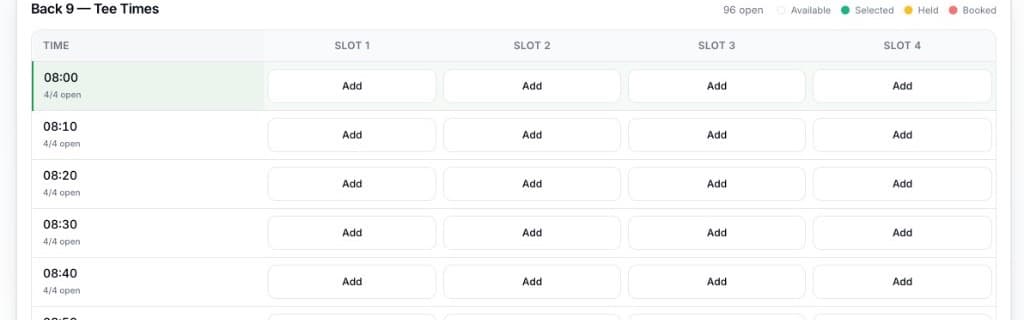
A four-ball is just four players sharing a tee time — and that's exactly how PlayerConnect's tee sheet works: each tee time has a fixed number of player slots, and golfers claim as many of them as they need.
Real PlayerConnect tee sheet — four player slots per tee time, with a live open count.
Customer experience
From choosing a round to walking up to the first tee, the whole booking takes a couple of minutes and no phone call.
Pick a round and a date
Front 9, Back 9, 18 holes, twilight — whatever rounds your course sells.
See the live tee sheet
Every tee time shows how many of its slots are still open, updated in real time.
Tap into open slots
Claim one, two, three or four slots on the same tee time to book solo or as a group.
Add contact details
Book as a guest, or sign in to save the booking to an account for later.
Pay securely by card
Card payment is taken at the time of booking, so the round is paid for in advance.
Get confirmed, manage later
An instant email confirmation with a calendar invite follows, and signed-in golfers can view or cancel the booking online.
Where a venue offers add-ons such as cart hire, they can be included when booking a single tee time — ask us about group checkout if you need add-ons across a full four-ball.
Pro shop & front desk
No separate system for phone and walk-in bookings. Staff see the identical live tee sheet a golfer sees online, so a tee time can never be sold twice.
The bigger picture
Most venues that run a course also run a range, and often coaching or memberships too. PlayerConnect doesn't treat them as separate products — they're the same platform, the same account, the same console.
A golfer who books a tee time and a range session has one account and one booking history — not two separate systems that don't talk to each other.
Because bookings across activities share the same cart, a golfer can add a driving-range session to the same checkout as their tee time — paid together, once.
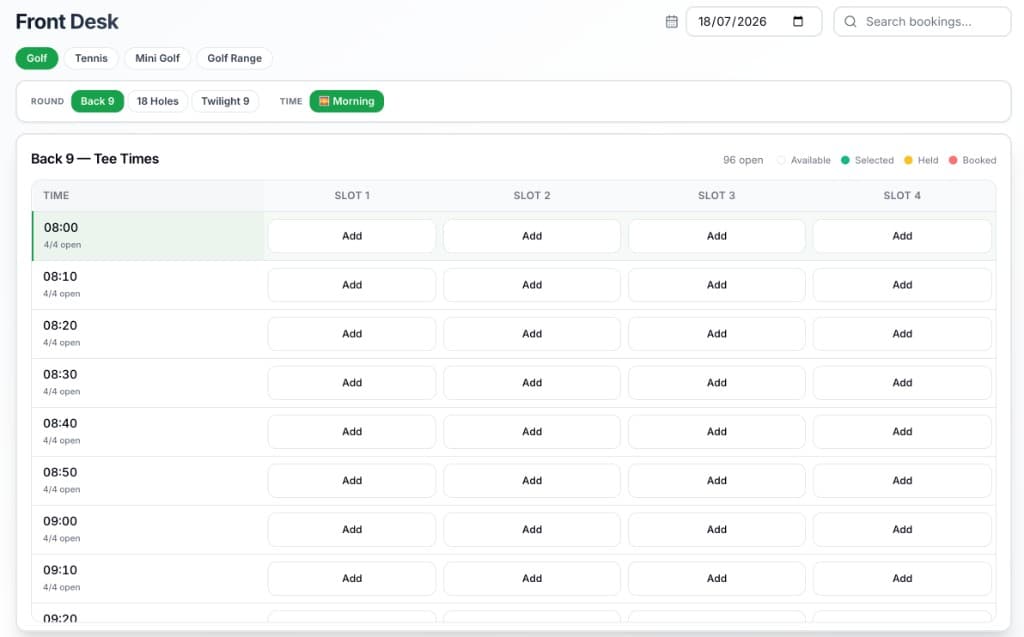
The same Front Desk your team uses for the tee sheet also runs the range, courts or any other activity — switched with a single tab, not a second login.
Every booking across the course and range settles to the same payment account and shows up in the same reports — no reconciling two systems at month end.
Where a venue configures them, add-ons like range balls or a practice bucket can be offered alongside a tee-time booking, the same way cart hire can.
One customer database and one booking engine behind both the course and the range means fewer systems to maintain, reconcile and pay for.
Notice the Golf Range tab next to Golf — same console, same day, one login.
Built to match how your course runs
Interval, hours, pricing and access are set by your team, per venue, so the platform fits the way you already run tee times rather than forcing a generic booking calendar on your course.
Set how often tee times start — every 8, 10 or 12 minutes, your call.
Four by default, adjustable if your course runs a different group size.
Set opening and closing times for each day of the week, and mark any day closed.
Give twilight, 18-hole or 9-hole rounds their own start and finish windows, independent of your general hours.
Price each round type on its own, with peak-period surcharges where demand supports it.
Control how far ahead golfers can book, with a longer window for members.
Every venue runs on its own local timezone — correct if you operate more than one course.
Require payment at the time of booking, and offer add-ons where you configure them.
Who it's for
From a single pay-and-play course to a multi-venue operator, the platform adapts to your structure rather than assuming every course runs the same way.
Pay-and-play courses replace the phone queue at opening time with a live tee sheet golfers can book from any time, day or night.
Members get priority booking windows and guest passes; casual play is still bookable online at the rates your club sets.
Guests book a round the same way they'd book anything else on-site, with the round settling to the same payment and reporting as the rest of the resort's activities.
One platform for both, with shared customer accounts, a shared cart and one staff console — see the section above for how that works in practice.
Manage several courses or venues from one console, with role-based staff access and each venue keeping its own hours, pricing and branding.
Operators managing golf alongside other public sporting facilities can run every asset — golf, tennis, courts, greens — from the same system.
Beyond the tee sheet
Golf course booking is one piece of what PlayerConnect runs. The same account underneath also covers payments, memberships, reporting and every other activity your venue offers.
Pricing & memberships
Each round type is priced on its own, with peak-period surcharges where demand supports it. Then give your regulars a reason to commit: memberships with automatic monthly billing, guest passes and an earlier booking window than casual play.
Reporting
Bookings and revenue by day, by activity and by booking source — so you can see how the course is performing next to the range, coaching or any other activity you run, from one dashboard instead of separate spreadsheets.
FAQ
Golf course booking software is a platform golfers use to book and pay for tee times online, and your pro shop uses to manage the same tee sheet — instead of running a phone diary and a separate payment process.
Yes. Every tee time has a set number of player slots — four by default, adjustable per venue — and golfers tap into one, two, three or four open slots on the same tee time to book a full four-ball.
Yes. A golfer can book just their own slot, or claim two or three slots for a smaller group, leaving the remaining slots open for someone else to book online or at the counter.
Yes. The course and range run on the same platform, with one customer account, one shared cart for checkout, and one staff console — not two separate systems.
Golf pricing is set per round type today — for example 18 holes priced differently to twilight — rather than by player category on the tee sheet itself. Player-type pricing is available for other activities like the driving range.
Staff can create walk-in and phone bookings into any open slot, check golfers in, and cancel a booking when needed. Editing or rescheduling an existing tee time from the console isn't available today — a booking is cancelled and rebooked instead.
Yes. Card payment is taken securely at the time of booking, so the round is paid for before the golfer arrives.
Yes. Course memberships can include automatic monthly billing, guest passes and a longer advance-booking window than casual play, with perks applied automatically once a member signs in to book.
PlayerConnect includes point-of-sale support for in-person payments at the front desk. If you have a specific system you rely on, ask us about it directly during a demo.
Yes. Public and pay-and-play courses use PlayerConnect to sell tee times online around the clock, while staff keep taking phone and walk-in bookings from the same live tee sheet.
Yes. Your booking site carries your logo, colours and styling on your own subdomain, and confirmation emails are sent in your venue's name.
Yes. Multi-course and multi-location operators manage every venue from one console, with role-based staff access and each venue keeping its own hours, pricing and timezone.
See your own tee sheet, round pricing and staff console set up in a short demo — with your course's activities, not a generic example.
Request a demo
Tell us a little about your venue and we'll walk you through the platform — the customer booking experience, the staff console, and how your sports, resources and pricing would be set up.
Prefer email? Reach us directly and we'll get back to you — whether it's a demo, pricing, or a question about whether PlayerConnect fits your venue.
hello@playerconnect.com.au